The court’s own documents
- eBooks Practice Note (GPN-eBOOKS)The version in force from 11 June 2026
- Technical guide to the provision and filing of eBooksAt 17 August 2022
This page explains them; it doesn’t replace them. A court’s orders in your matter, and any direction from chambers, come first.
When it applies
The eBooks Practice Note sets the Federal Court’s requirements for court books, books of authorities and other documents, such as affidavits, provided in electronic form. It applies both when you give an eBook to the Court, for example to a judge’s chambers, and when you file one. Where it is inconsistent with another practice note, it prevails.
The parties are expected to confer early about eBooks, and about who prepares them, taking into account each party’s resources. If you think a different arrangement would suit your matter better, the practice note asks you to tell the Court.
What every eBook needs
- Searchable text. The text must be searchable and able to be copied. Scanned pages need text recognition (OCR) first.
- Landscape pages the right way round. A page laid out in landscape must appear that way, without the reader having to rotate it.
- The format chambers asks for. The chambers of the docket, list or duty judge say whether they want Format 1, Format 2, or both.
Format 1: an index that links to separate documents
A separate index, as a PDF or another kind of file such as Word or Excel, with a relative hyperlink to each document. The practice note asks that:
- the index is a table, with a row for each document giving its tab number, title and, where there is one, date, and with the documents grouped appropriately;
- each document is separate, so that following a link opens it and several can be open at once;
- the documents are mainly PDFs, but may be in their own form, such as a spreadsheet, where that suits;
- the pages are numbered in one sequence across the book, and those numbers match any Format 2 or paper version;
- in a book of authorities, each document is named by its tab number and the authority, such as “02. Décor v Dart [1991] FCA 844”;
- in an affidavit, each annexure is bookmarked within the affidavit’s PDF, and where an annexure is itself a bundle, each document in it is listed and bookmarked, with nested bookmarks if needed.
The Court’s technical guide adds a point that is easy to miss. Where the index is a PDF, the “attachments” are meant to be file attachments saved within the index PDF, so that they move with it, rather than files that sit elsewhere and open from a link.
Format 2: one bookmarked PDF
One PDF, with:
- an index at the front: a table with a row for each document giving its tab number, title, date where there is one, and page number, grouped appropriately;
- an internal hyperlink from each line of the index to its document;
- a bookmark for each document, titled with its tab number and a brief description, such as “01. Originating application” or “34. Email from Smith to Jones 12.9.23”;
- for a book of authorities, a bookmark for each authority in the same way;
- for affidavits, a separate bookmark for each annexure, and where an annexure is a bundle, each document in it listed and bookmarked.
Page numbers
In both formats the pages are numbered in one run for the whole book, whatever numbering each document already has. In Format 2, the page numbers the PDF viewer displays must match the numbers printed on the pages. The simplest way to achieve that is to number from the very first page of the PDF, so page 1 is the first page. If your numbering starts later, set the PDF’s page labels so the viewer shows the printed number instead of the position in the file.
Format 1, Format 2 and any paper copy must all use the same page numbers.
What goes in
A court eBook should hold all the material filed by all parties that is relevant to the hearing. Material that is subject to objection goes in too, and is identified as subject to objection, in the index or otherwise.
For authorities, separate books for each party should be avoided. Instead there is one joint book with everything the parties will rely on, in three sections, each in alphabetical order:
- authorities;
- legislation;
- bills and other explanatory material.
Where only extracts of a document are relied on, all the extracts go in a single consolidated document, and extracts from legislation show the date in force of the extract.
File size and eLodgment
An eBook given to the Court must also be filed as soon as reasonably practicable. The technical guide explains how file size affects filing:
| Size of the eBook | How it is filed |
|---|---|
| Under 30 MB | Lodged through the eLodgment portal, in a single volume. |
| 30 to 50 MB | Given to the District Registry in a single volume, by a link to a secure file-sharing service (the Court’s preferred way) or on a USB, and filed by the Registry. |
| Over 50 MB | Given to the Registry in the same way. The sealed copy filed is split into parts under 50 MB each, but at the hearing everyone works from the single volume first provided. |
Before then, make the file as small as is sensible: scan at a lower resolution, colour and quality where that still reads well, and reduce the file size when saving the PDF.
Making a Format 2 eBook by hand
- Convert every document to PDF, and make scanned pages searchable.
- Put them in order, in their groups, and give each a tab number.
- Combine them into one PDF behind a cover page.
- Number every page in one run with your PDF editor’s page numbering or header and footer tool, starting at 1, clear of the text.
- Write the index as a table with tab, title, date and page, make it a PDF and put it at the front. If adding it moves the pages, number them again.
- Link each line of the index to the first page of its document.
- Add a bookmark for each document, titled with its tab number and description, and bookmark annexures under their affidavit.
- Check that landscape pages read the right way round, that the page numbers the PDF shows match the printed ones, and that every link and bookmark goes where it should.
- Check the file size against the eLodgment limit.
Our guide to preparing a court bundle covers each step in more detail.
With Sudex
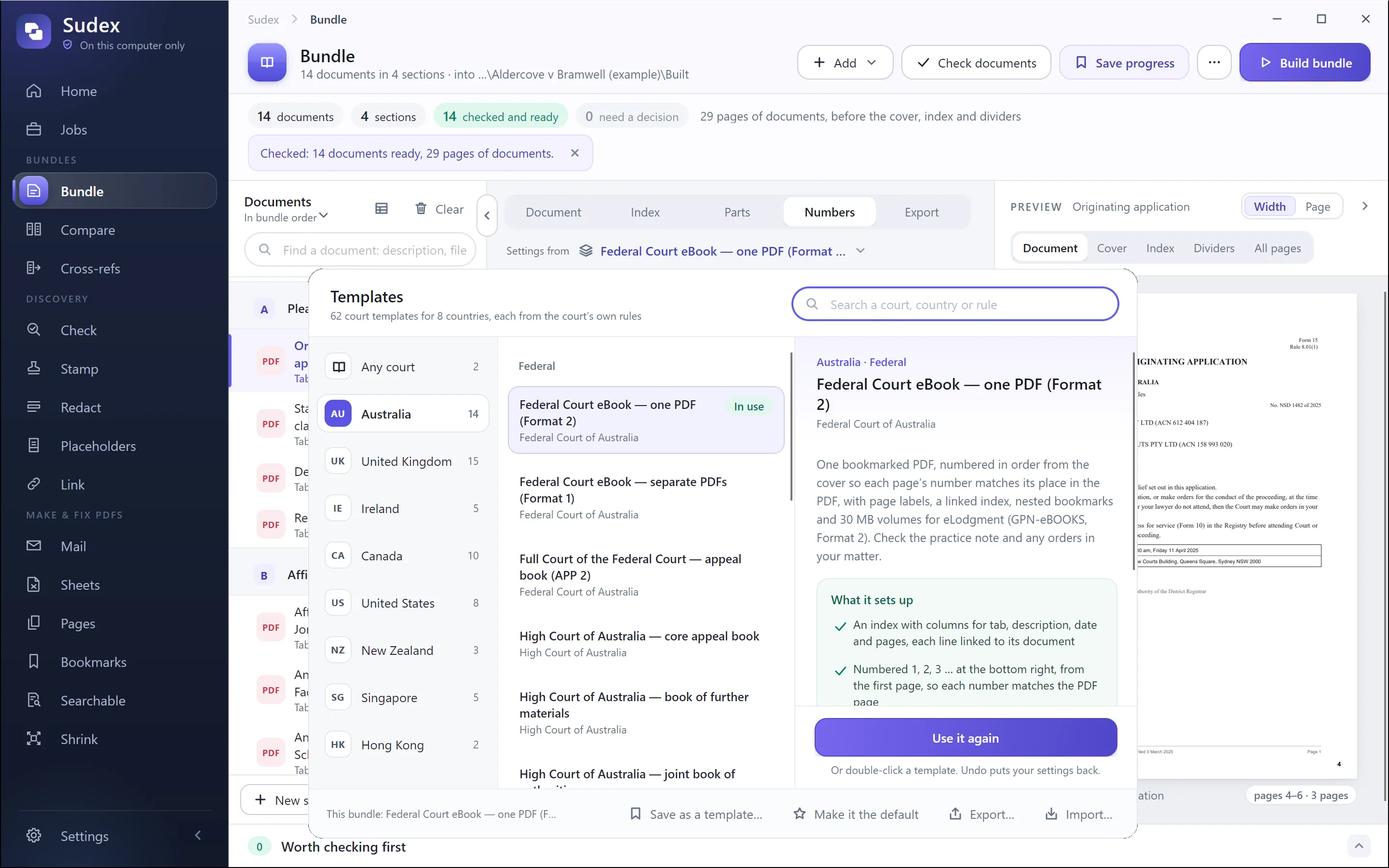
For any court, our guide on how to prepare a court bundle goes step by step. Free: number a bundle’s pages in your browser, and a court bundle index template for Word and Excel.
Sudex’s templates for this court, and for other courts in Australia, are listed on Australia: court templates.